Back Cover Removal

Prerequisite Only
This is a prerequisite-only guide! This guide is part of another procedure and isn’t meant to be used alone.

What you need

  1. Back Cover Removal, Back Cover Removal: step 1, image 1 of 2 Back Cover Removal, Back Cover Removal: step 1, image 2 of 2
    Tool used on this step:
    Tweezers
    $4.99
    Buy
    • Before you begin, be sure to turn off your laptop and unplug it from the outlet.

    • Use tweezers to pry and remove the center screw cover on the back cover.

  2. Back Cover Removal: step 2, image 1 of 2 Back Cover Removal: step 2, image 2 of 2
    • Use a Phillips screwdriver to unscrew the nine 6.8 mm screws securing the back cover.

  3. Back Cover Removal: step 3, image 1 of 1
    • Use a spudger to pry around the base edges of the back cover to loosen it from the laptop.

    • Do not fully remove the cover, as it is still attached to the laptop with cables.

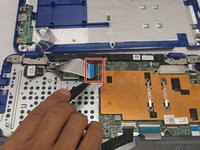
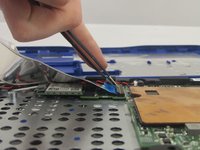
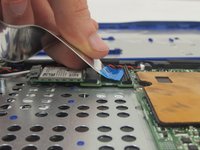
  4. Back Cover Removal: step 4, image 1 of 3 Back Cover Removal: step 4, image 2 of 3 Back Cover Removal: step 4, image 3 of 3
    • If you are only replacing the battery, you can skip this step. Be careful not to strain the still-connected cable as you work.

    • Unlock the wide ZIF connector securing the flex cable.

    • To unlock a ZIF connector, use the tip of a spudger or your fingernail to flip up the small, hinged locking flap.

    • Pull the ribbon cable outwards to disconnect the back cover from the motherboard.

Conclusion

To reassemble your device, follow these instructions in reverse order.

One other person completed this guide.

0 Guide Comments

Add Comment

View Statistics:

Past 24 Hours: 0

Past 7 Days: 0

Past 30 Days: 3

All Time: 98