Free Shipping on Domestic Orders $75+

Casio W-753 Battery Replacement

What you need

  1. Casio W-753 Battery Replacement, Battery: step 1, image 1 of 3 Casio W-753 Battery Replacement, Battery: step 1, image 2 of 3 Casio W-753 Battery Replacement, Battery: step 1, image 3 of 3
    • Undo the band of the watch to create a clear view of the back.

  2. Casio W-753 Battery Replacement: step 2, image 1 of 3 Casio W-753 Battery Replacement: step 2, image 2 of 3 Casio W-753 Battery Replacement: step 2, image 3 of 3
    • With the back of the watch facing towards you, use the Phillips #000 Screwdriver to turn the 2.0mm screws counterclockwise to remove them from the watch.

  3. Casio W-753 Battery Replacement: step 3, image 1 of 3 Casio W-753 Battery Replacement: step 3, image 2 of 3 Casio W-753 Battery Replacement: step 3, image 3 of 3
    • Separate the backing from the watch.

  4. Casio W-753 Battery Replacement: step 4, image 1 of 3 Casio W-753 Battery Replacement: step 4, image 2 of 3 Casio W-753 Battery Replacement: step 4, image 3 of 3
    • Use the screwdriver or tweezers to remove the sticker.

  5. Casio W-753 Battery Replacement: step 5, image 1 of 3 Casio W-753 Battery Replacement: step 5, image 2 of 3 Casio W-753 Battery Replacement: step 5, image 3 of 3
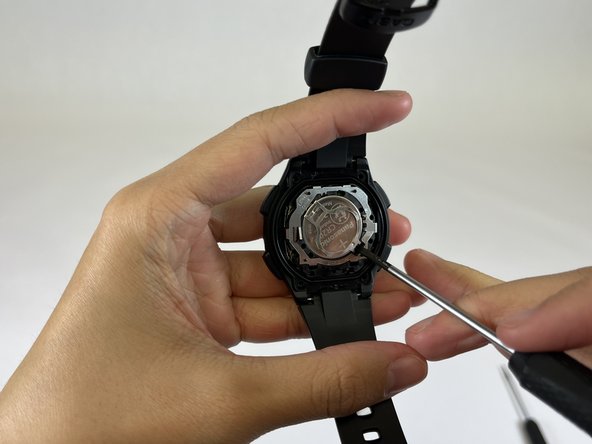
    • Wedge the screwdriver between the battery and the body of the watch.

  6. Casio W-753 Battery Replacement: step 6, image 1 of 3 Casio W-753 Battery Replacement: step 6, image 2 of 3 Casio W-753 Battery Replacement: step 6, image 3 of 3
    • Push down on the screwdriver to lift up the battery and the metal frame.

    • Be sure not to damage the metal frame as that could impact the function of the watch.

  7. Casio W-753 Battery Replacement: step 7, image 1 of 3 Casio W-753 Battery Replacement: step 7, image 2 of 3 Casio W-753 Battery Replacement: step 7, image 3 of 3
    • Slide the battery out of the watch.

  8. Casio W-753 Battery Replacement: step 8, image 1 of 3 Casio W-753 Battery Replacement: step 8, image 2 of 3 Casio W-753 Battery Replacement: step 8, image 3 of 3
    • Place the new battery back underneath the metal framing and into the watch.

  9. Casio W-753 Battery Replacement: step 9, image 1 of 1
    • Press and hold the metal frame into place, making sure that it clicks and stays closed.

  10. Casio W-753 Battery Replacement: step 10, image 1 of 2 Casio W-753 Battery Replacement: step 10, image 2 of 2
    • Place the sticker over the frame into its original position.

  11. Casio W-753 Battery Replacement: step 11, image 1 of 2 Casio W-753 Battery Replacement: step 11, image 2 of 2
    • Place the metal backing of the watch back into position.

  12. Casio W-753 Battery Replacement: step 12, image 1 of 3 Casio W-753 Battery Replacement: step 12, image 2 of 3 Casio W-753 Battery Replacement: step 12, image 3 of 3
    • Place the screws, turning them clockwise to tighten and secure the back in place.

Conclusion

With this replacement, your watch should last for another 5-8 years!

Estrella Bella

Member since: 02/01/24

205 Reputation

1 Guide authored

Team

UC Davis, Team 4-7, Andersen Winter 2024 Member of UC Davis, Team 4-7, Andersen Winter 2024

UCD-ANDERSEN-W24S4G7

3 Members

1 Guide authored

0 Guide Comments

Add Comment

View Statistics:

Past 24 Hours: 0

Past 7 Days: 10

Past 30 Days: 44

All Time: 965