Introduction
This guide covers how to replace the battery in a Dell Precison 7560. When replacing the battery, make sure to completely power off your device. Not doing so will cause a Fire Hazard. The battery is responsible for powering your device, so it is very hazardous.
What you need
-
-
Use a Phillips #0 screwdriver to loosen the the eight 5 mm captive screws in the bottom cover.
-
Remove the back cover by lifting at the corners.
-
-


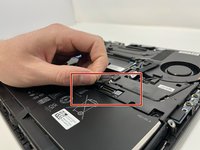
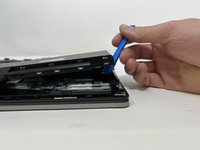
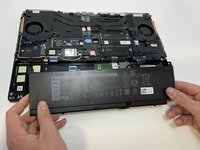
To reassemble your device, follow these instructions in reverse order.
Cancel: I did not complete this guide.
3 other people completed this guide.


Team

Utah Tech University, Team 1-1, McMurrin Spring 2023 Member of Utah Tech University, Team 1-1, McMurrin Spring 2023
UTAHTECH-MCMURRIN-S23S1G1
3 Members
6 Guides authored
1 Guide Comment
Was able to reset a battery that stopped charging with these instructions, appreciate it!
