Introduction
You love your JBL Flip 3, but the battery is running low? No need to panic! With this step-by-step guide, we'll show you how to replace your speaker's battery yourself. It's easier than you think - and more environmentally friendly than buying a new device. You can do it!
What you need


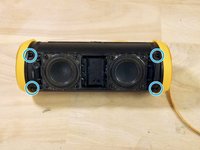


Repeat the same steps in reverse order to reassemble your device.
Cancel: I did not complete this guide.
5 other people completed this guide.
Special thanks to these translators:
100%


These translators are helping us fix the world! Want to contribute?
Start translating ›

3 Guide Comments
Uncomplete and Sketchy!
How come is this a battery replacement guide? It is only up to the removal of the second protective layer. Many questions remain: How to locate the battery? How to unplug it? How to remove it? How to plug the new one? How to reassamble? …
You're right, the current version does not answer your questions. However, it seems that 5 people could still successfully repair their device with the help of that guide, so rather than taking it down, we'd suggest you and others help complete the guide by adding your pictures and information you found?
