Free Shipping on Domestic Orders $75+

LG VX5400 Battery Replacement

  1. LG VX5400 Battery Replacement, Battery: step 1, image 1 of 1
    • Turn off the cell phone and turn it over on its back side

  2. LG VX5400 Battery Replacement: step 2, image 1 of 1
    • Hold the phone case in your palm and slide the back cover towards yourself using your thumb

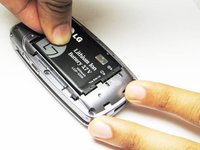
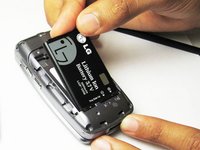
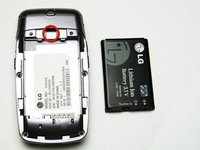
  3. LG VX5400 Battery Replacement: step 3, image 1 of 3 LG VX5400 Battery Replacement: step 3, image 2 of 3 LG VX5400 Battery Replacement: step 3, image 3 of 3
    • Slide a tool or finger into the notch at the top of the battery to carefully remove it.

Conclusion

To reassemble your device, follow these instructions in reverse order.

One other person completed this guide.

Sourabh

Member since: 04/15/10

132 Reputation

3 Guides authored

Team

Cal Poly, Team 26-26, Regan Spring 2010 Member of Cal Poly, Team 26-26, Regan Spring 2010

CPSU-REGAN-S10S26G26

4 Members

11 Guides authored

0 Guide Comments

Add Comment

View Statistics:

Past 24 Hours: 0

Past 7 Days: 2

Past 30 Days: 5

All Time: 3,437