Free Shipping on Domestic Orders $75+

Lenovo Essential B570 Back Panel Replacement

What you need

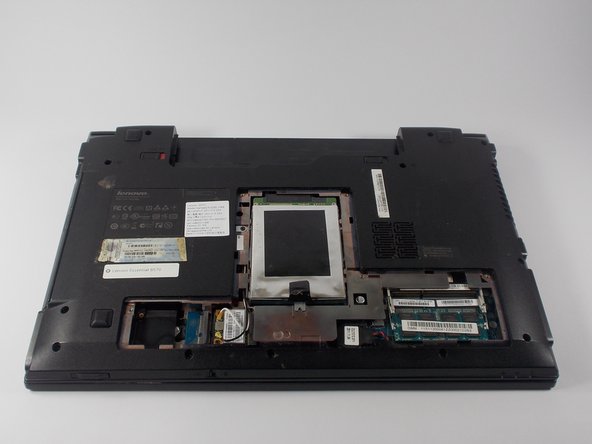
  1. Lenovo Essential B570 Back Panel Replacement, Back Panel: step 1, image 1 of 1
    • Loosen the five Philips screws that secure the panel.

    • The screws do not actually fully remove from the panel. Loosening them as much as you can will be enough to disconnect them from the laptop.

  2. Lenovo Essential B570 Back Panel Replacement: step 2, image 1 of 3 Lenovo Essential B570 Back Panel Replacement: step 2, image 2 of 3 Lenovo Essential B570 Back Panel Replacement: step 2, image 3 of 3
    • Prop open the cover with a plastic opening tool.

    • If the cover does not come off easily, do not force it. Make sure all screws are loosened.

Conclusion

To reassemble your device, follow these instructions in reverse order.

4 other people completed this guide.

Samuel Filliettaz

Member since: 10/20/15

864 Reputation

5 Guides authored

Team

UMass Dartmouth, Team 4-5, Catania Fall 2015 Member of UMass Dartmouth, Team 4-5, Catania Fall 2015

UMASSD-CATANIA-F15S4G5

4 Members

6 Guides authored

0 Guide Comments

Add Comment

View Statistics:

Past 24 Hours: 0

Past 7 Days: 0

Past 30 Days: 12

All Time: 1,437