Motorola C168 SIM Card Replacement

  1. Motorola C168 SIM Card Replacement, Battery: step 1, image 1 of 2 Motorola C168 SIM Card Replacement, Battery: step 1, image 2 of 2
    • Turn the phone so its back is facing you.

    • Press the release button on the back cover, while simultaneously pulling the cover down.

    • Remove the back cover.

  2. Motorola C168 SIM Card Replacement: step 2, image 1 of 2 Motorola C168 SIM Card Replacement: step 2, image 2 of 2
    • Pinch the sides of the bottom of the battery and pull upward.

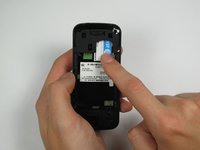
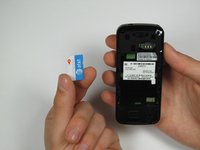
  3. Motorola C168 SIM Card Replacement, SIM Card: step 3, image 1 of 2 Motorola C168 SIM Card Replacement, SIM Card: step 3, image 2 of 2
    • Press and slide the SIM card down.

    • Remove the SIM card.

Conclusion

To reassemble your device, follow these instructions in reverse order.

Dan Baifus

Member since: 04/17/12

16 Reputation

1 Guide authored

Team

Cal Poly, Team 12-40, Regan Spring 2012 Member of Cal Poly, Team 12-40, Regan Spring 2012

CPSU-REGAN-S12S12G40

4 Members

10 Guides authored

0 Guide Comments

Add Comment

View Statistics:

Past 24 Hours: 0

Past 7 Days: 1

Past 30 Days: 4

All Time: 1,313