Nikon Coolpix L820 Shutter Button Replacement

What you need

  1. Nikon Coolpix L820 Shutter Button Replacement, Settings Buttons: step 1, image 1 of 3 Nikon Coolpix L820 Shutter Button Replacement, Settings Buttons: step 1, image 2 of 3 Nikon Coolpix L820 Shutter Button Replacement, Settings Buttons: step 1, image 3 of 3
    • Remove the battery before beginning.

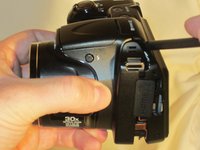
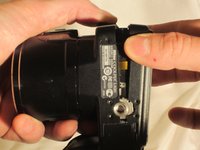
    • Use a Phillips #0 screwdriver to remove the screws on the front casing. There are 10 screws around the casing. 3 are located on the left side of the camera, 6 are located on the bottom near the product label, and 1 is located on the right side of the camera.

  2. Nikon Coolpix L820 Shutter Button Replacement: step 2, image 1 of 2 Nikon Coolpix L820 Shutter Button Replacement: step 2, image 2 of 2
    • Next, remove the screw held on top of the camera above the Nikon logo.

    • Moving to the bottom of the camera, open the empty battery slot, and locate the 4 screws in the compartment. Begin removing the 4 screws located within.

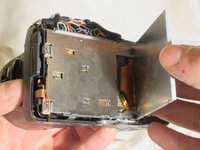
  3. Nikon Coolpix L820 Shutter Button Replacement: step 3, image 1 of 3 Nikon Coolpix L820 Shutter Button Replacement: step 3, image 2 of 3 Nikon Coolpix L820 Shutter Button Replacement: step 3, image 3 of 3
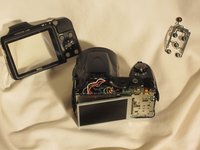
    • Using the spudger, begin prying the case from the device, carefully separating the rear housing from the camera assembly. Once the rear housing is separated, the camera's physical buttons will be accessible for replacement.

    • Be sure to only apply pressure to the casing panels, not internal electronics. Doing so can damage the internal components of the camera.

  4. Nikon Coolpix L820 Shutter Button Replacement, LCD screen: step 4, image 1 of 3 Nikon Coolpix L820 Shutter Button Replacement, LCD screen: step 4, image 2 of 3 Nikon Coolpix L820 Shutter Button Replacement, LCD screen: step 4, image 3 of 3
    • Remove the front casing around the LCD screen from the camera.

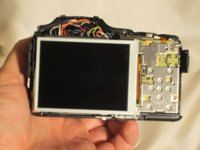
    • Avoid putting pressure or moving the exposed wires. This can damage them and cause lasting issue to the camera.

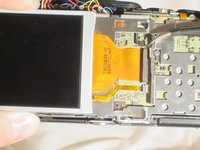
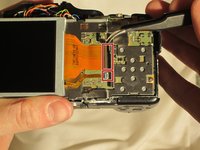
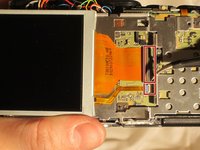
  5. Nikon Coolpix L820 Shutter Button Replacement: step 5, image 1 of 3 Nikon Coolpix L820 Shutter Button Replacement: step 5, image 2 of 3 Nikon Coolpix L820 Shutter Button Replacement: step 5, image 3 of 3
    Tool used on this step:
    Tweezers
    $4.99
    Buy
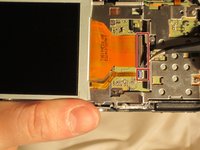
    • Using the tweezers shown in the materials list, lift the hinges connecting the two ribbon wires to the camera. The wires will unlatch from the device.

  6. Nikon Coolpix L820 Shutter Button Replacement: step 6, image 1 of 2 Nikon Coolpix L820 Shutter Button Replacement: step 6, image 2 of 2
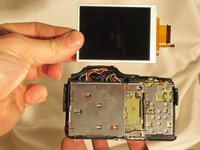
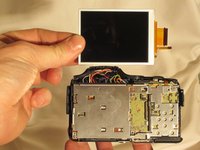
    • Once the ribbon wires are disconnected, remove the LCD screen from the camera.

    • Safely store the LCD for reinstallation.

  7. Nikon Coolpix L820 Shutter Button Replacement, Shutter Button: step 7, image 1 of 1
    • Remove the five screws from the back of the camera using a Phillips #0 screwdriver.

  8. Nikon Coolpix L820 Shutter Button Replacement: step 8, image 1 of 1
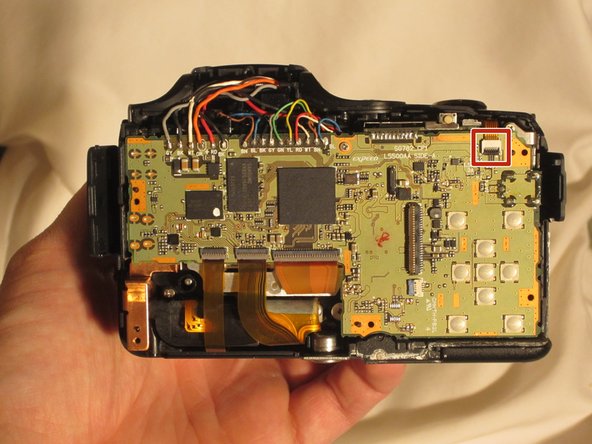
    • Using the pointed edge of the spudger, remove the hinge that secure's the camera's flex circuit. This will unfasten the camera's ribbon wire.

  9. Nikon Coolpix L820 Shutter Button Replacement: step 9, image 1 of 1
    • Remove the shutter's plastic cover from the camera by lifting the piece up. It will disconnect from the device.

  10. Nikon Coolpix L820 Shutter Button Replacement: step 10, image 1 of 1
    Tool used on this step:
    Tweezers
    $4.99
    Buy
    • Remove the metal cover using tweezers to allow access to the shutter button. Take the new shutter button and place it where the original piece was located.

Conclusion

To reassemble your device, follow these instructions in reverse order.

2 other people completed this guide.

Jimmy Kendall

Member since: 03/23/15

137 Reputation

1 Guide authored

Team

3 Guide Comments

Muy bueno pero falta documentar 3 tornillos.

1. En el paso 1, en la tercera foto debajo del sticker del código de barras.

2. En el paso 2, justo en el fondo del compartimento de una de las baterías (la del extremo). Incluso se alcanza a apreciar en la foto.

3. En el paso 8, en esa misma pieza de metal a un lado está el otro tornillo.

cyrez_1509 - Reply

My shutter button still works but doesn’t give feedback. It’s hard to tell when I’ve taken a picture because it doesn’t “click.” I’m wondering if that’s something that can be fixed, but I can’t tell if the mechanism for that feedback is in the mechanical portion above (and maybe a piece of metal broke) or built into the switch soldered on the circuit board.

JM Palacios - Reply

Dove si può acquistare il bottone a buon prezzo? grazie

Where can you buy the button at a good price? Thank you

Massimino Diquarto - Reply

Add Comment

View Statistics:

Past 24 Hours: 1

Past 7 Days: 22

Past 30 Days: 71

All Time: 3,732