Nintendo 3DS Microphone Replacement

Prerequisite Only
This is a prerequisite-only guide! This guide is part of another procedure and isn’t meant to be used alone.

What you need

  1. Nintendo 3DS Microphone Replacement, Microphone: step 1, image 1 of 2 Nintendo 3DS Microphone Replacement, Microphone: step 1, image 2 of 2
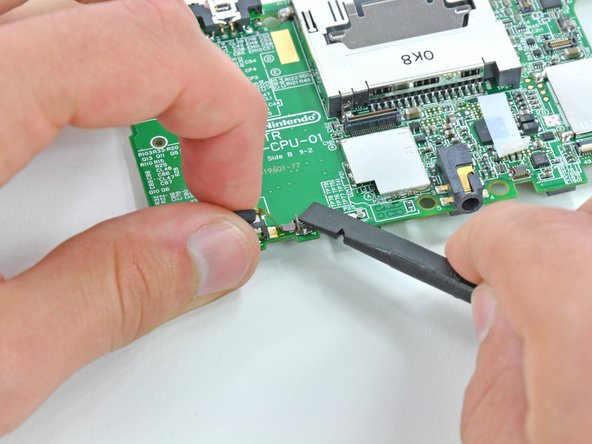
    • Use the flat end of a spudger or your fingernail to flip up the retaining flap on the microphone ribbon cable ZIF socket.

    • Be sure you are prying up on the hinged retaining flap, not the socket itself.

  2. Nintendo 3DS Microphone Replacement: step 2, image 1 of 1
    • Lift the microphone and its attached ribbon cable off the motherboard.

Conclusion

To reassemble your device, follow these instructions in reverse order.

David Hodson

Member since: 04/13/10

154,746 Reputation

127 Guides authored

0 Guide Comments

Add Comment

View Statistics:

Past 24 Hours: 0

Past 7 Days: 0

Past 30 Days: 2

All Time: 286