Free Shipping on Domestic Orders $75+

Nintendo DS Lite Battery Disconnect

Prerequisite Only
This is a prerequisite-only guide! This guide is part of another procedure and isn’t meant to be used alone.

What you need

  1. Nintendo DS Lite Battery Disconnect, Nintendo DS Lite Battery Disconnect: step 1, image 1 of 1
    • Place your device upside down and locate the battery compartment.

    • Find the Phillips head screw securing the battery cover in the bottom right hand corner of the device.

    • Loosen the screw enough to remove the battery cover but leave the screw in the cover for reassembly.

    • Use only a Phillips screwdriver to remove screw.

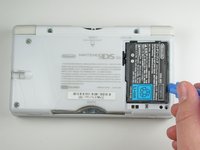
  2. Nintendo DS Lite Battery Disconnect: step 2, image 1 of 1
    • Slowly remove the battery cover with the iFixit opening tool.

    • Make sure to remove the cover carefully to keep from losing Phillips screw in the cover. It will be needed for reassembly.

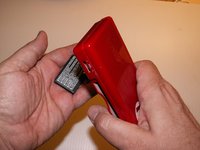
  3. Nintendo DS Lite Battery Disconnect: step 3, image 1 of 2 Nintendo DS Lite Battery Disconnect: step 3, image 2 of 2
    • Use the iFixit opening tool to carefully pry the battery out of the case.

    • After the old battery is removed replace it with a new battery facing the same direction as when the cover was opened.

    • For some devices, you may be able to remove the battery by flipping the DS over and letting the battery fall into your hand.

Conclusion

To replace battery and reassemble your device, follow these instructions in reverse.

2 other people completed this guide.

Brittany K

Member since: 01/21/10

1,559 Reputation

4 Guides authored

Team

Cal Poly, Team 16-30, Maness Winter 2010 Member of Cal Poly, Team 16-30, Maness Winter 2010

CPSU-MANESS-W10S16G30

4 Members

29 Guides authored

0 Guide Comments

Add Comment

View Statistics:

Past 24 Hours: 0

Past 7 Days: 1

Past 30 Days: 3

All Time: 5,742