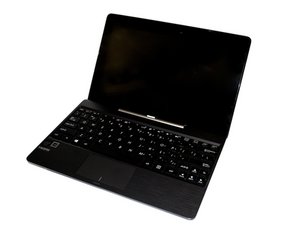
Replacing of hard drive
Location, replacement, and largest size that can be on tablet on the Asus Transformer T100
Is this a good question?
Score
1
Free Shipping on Domestic Orders $75+

Rep: 13
 1
1
 1
1
Location, replacement, and largest size that can be on tablet on the Asus Transformer T100
Is this a good question?

Rep: 79
3
You cannot replace the "hard drive" because it doesn't have one. It has an integrated chip that's solid state. What you can do though, is use a micro sd, and get a OTG (on the go) connector for your micro usb, and connect tons of usb thumbdrive sticks to it, or an external HDD.
Was this answer helpful?
What if your hard drive is working correctly and the administrator is not functioning
The tablet itself does not have a hard drive. But the detachable keyboard absolutely DOES have a hdd unit.....
I have two of these T100 and neither have a hard drive in the keyboard.. both stuck in bios. When i tried booting the drive it gets error )xc0000001.

Rep: 13
1
Dustin is correct for most Asus T100. But Asus does produce a version with a 500GB hard drive installed in the keyboard unit. The standard unit, without the hard drive, is likely a T100TAM-C1. The unit with an installed 500GB drive is a T100TAM-H2.
I am not 100% sure, but I believe all keyboards are wired for the hard drive, regardless if one is installed, or not. So a hard drive can be added to a unit after purchase.
Was this answer helpful?
Sorry, the ASUS Keyboard dock without an HD are too thin and lack the interface for a har drive.
Those keyboards are only on the latest units, anything more than a year old does have an hdd installed. I am on my second of these, two different types and sizes, and they both had hdd's installed in their keyboard docks.

Rep: 13
1

I can assure you taht all of the keyboards are NOT the same. Mine does not have the space or the connectors to add a HDD.
Was this answer helpful?

Well, if it is a model with a hdd, here's a link as to how to replace it.
I was unfortunate enough to have the hdd in my t100ta fail, and this is how you take it out (or perhaps replace it)
Was this answer helpful?
why you were unfortunate , it didnt work ?!!
If a replacement keyboard says T100TAM-H2-GM, as mine does, another keyboard with the same number would not have a slot for a HDD?

The hard drive is located in the keyboard. My Asus Transformer book T100 has a hard drive problem and i found the location of it during the replacement
Was this answer helpful?
Past 24 Hours: 0
Past 7 Days: 18
Past 30 Days: 55
All Time: 25,144
